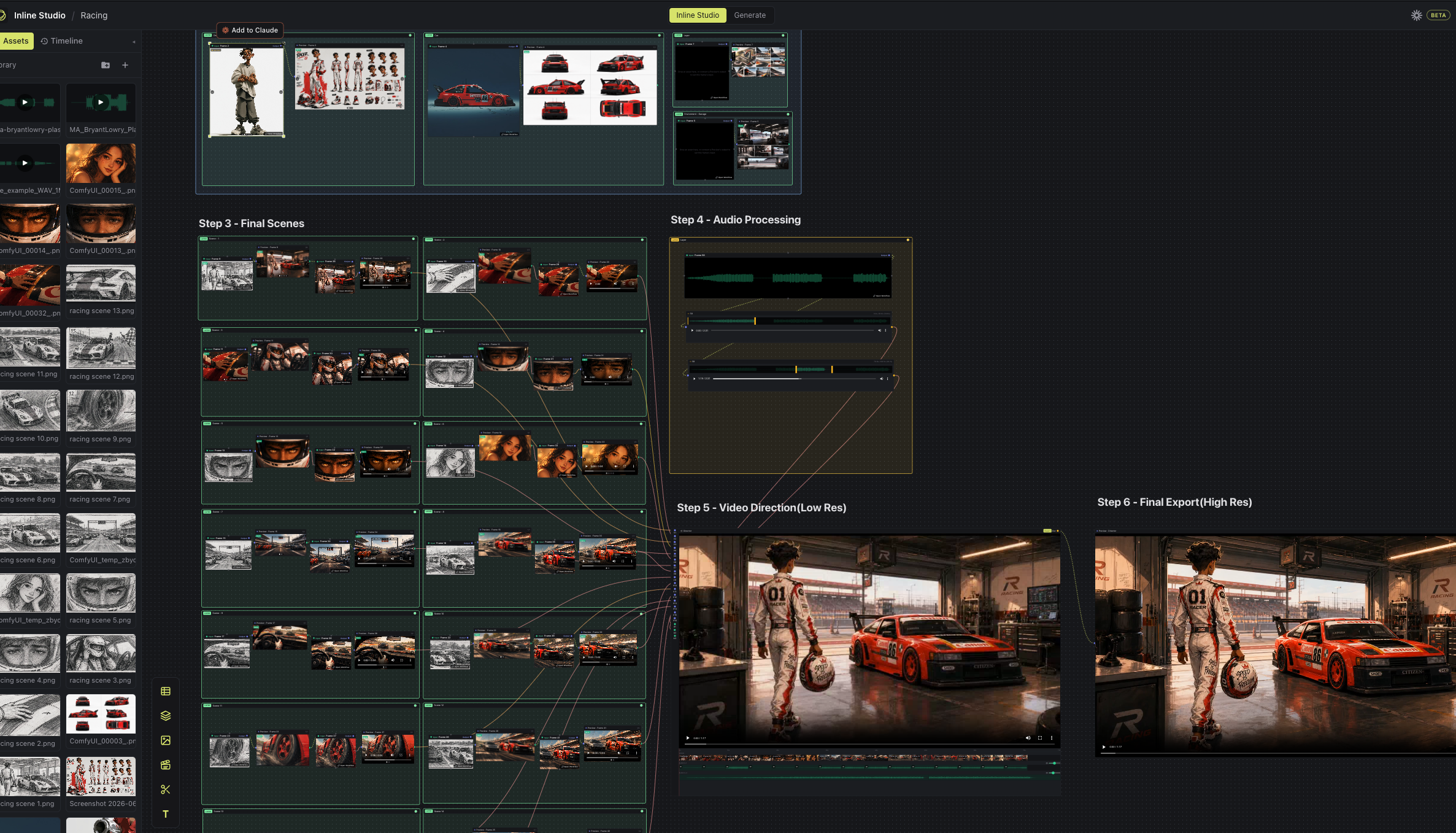
Inline Studio is a free, open-source app for AI filmmakers. Build a whole visual pipeline on a free-form node canvas, from moodboard to final cut, with local diffusion models (the built-in Inline Core engine) and hosted fal models. Every render is kept as a versioned, non-destructive take.




New here? Check out our getting started guide →
Inline Studio is a free, open-source app for AI filmmaking on a node canvas, powered by the built-in Inline Core engine (local diffusion models) and hosted fal models. It gives AI filmmakers a free-form canvas to build a whole visual pipeline, from moodboard to final cut.
- Non-destructive by default - every render is kept as a versioned take; generating again adds one, nothing is overwritten.
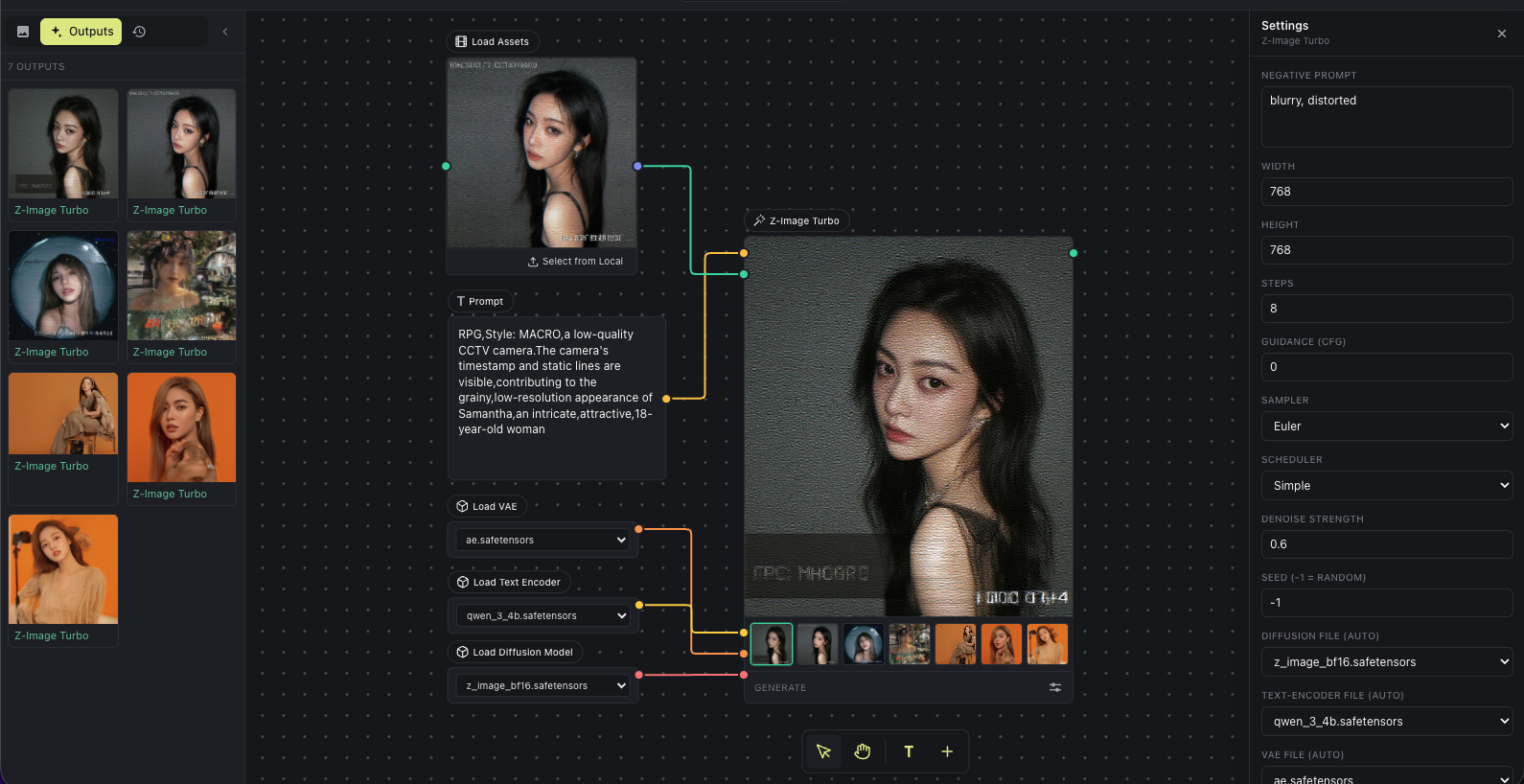
- Local diffusion generation engine - the built-in Inline Core engine runs popular diffusion models on your own GPU from a single model file, no external server. Currently supported: Z-Image Turbo.
- Hosted models via API Nodes - reach for closed models with no GPU and no setup for instant creative range; see API Nodes.
- Mix both in the same film - Inline Studio handles everything around the render: exploring options, keeping what works, and shaping a repeatable process you can iterate on and share.
It runs as a single process on one port: the Inline Core engine (Python) serves the web UI and does the generation: python core/main.py and open the browser. No desktop install, no separate backend.
Who it's for: AI filmmakers, motion artists, and generative creators who want to make AI short films and longer cuts without losing every good version along the way.
- Free-form node canvas - lay out your whole AI film like a mood board that can actually generate. Marquee-select, copy/paste, undo/redo, layers, and text notes all work the way your hands expect.
- Versioned, non-destructive takes - every render is kept. Generating again adds a new take; nothing is overwritten. Star the keeper and it flows downstream.
- Chain frames into a generative pipeline - wire one frame's output into the next frame's input. Refine a shot, feed it forward, regenerate the source, and everything downstream follows.
- Video editing on the canvas - the Video Director node is a timeline-in-a-node that assembles your rendered frames into a single cut, with layered audio (the videos' own audio plus your own music/VO), per-input and per-layer volume, an in-node preview to scrub, and high-res export; the Trim Video/Audio node lets you drop in a clip, drag the in/out handles over its filmstrip/waveform, and pass just the trimmed segment downstream.
- Local generation, built in - the Inline Core engine runs diffusion models on your own GPU. Z-Image Turbo from a single model file, no external server to set up.
- API Nodes for hosted models - run closed models right on the canvas with no GPU. Add a Generate node, pick a model, and bring your own provider key. See API Nodes.
- Free & open source (MIT) - one process (Python + a browser); runs on macOS, Windows, and Linux.
Follow our Animated Short Film with LTX 2.3 and GPT Image Generation tutorial →
Generating a single frame is the easy part. The work that makes an AI film is what comes after: exploring options, keeping what's good, and shaping a repeatable process out of it. Inline Studio is the layer where that happens, organised around one model:
From the home screen, Export zips a project into one archive. Import it on the other side and you get everything back: the inputs (every imported asset), the outputs (all the generated takes), and the graph that turned one into the other. Whoever opens it can re-run the pipeline exactly and keep iterating.
Pick whatever fits the shot, and mix all three in one film. However you render, the frame keeps its full take history, so you never lose a good version.
| How you render | What it's like | What you need |
|---|---|---|
| Local GPU: Inline Core (built in) | Drop a Z-Image Turbo node, wire a prompt, hit Run: one node, no loader/sampler wiring. A single .safetensors is all you bring; the engine pairs it with a VAE + text-encoder and downloads nothing behind your back. Two or more GPUs? It can split one image's denoise across them (xDiT). |
Your own GPU. No account, no external server. Low-VRAM friendly: it auto-fits the model to your card (streaming weights + int8) so a model too big for full precision still runs, with no flags. |
| Hosted: API Nodes | Add a Generate node and pick a model: hosted, closed models across image, video, and audio. No GPU, instant range. See API Nodes for the model list and providers. | A provider key (currently fal); it stays on your machine, and you pay per render (each node estimates the price first). |
| Your own ComfyUI (legacy) | Point Inline Studio at a running ComfyUI server and drive it from the Generate tab. | A ComfyUI instance. Being phased out in favour of Inline Core; fine for now, but don't build on it. |
For local generation, either drop a Z-Image .safetensors into core/models/diffusion_models/, or add a Z-Image node and use its model popup (a blinking hint shows up when something's missing) to download the diffusion model, VAE, and text-encoder into core/models/, with visible progress. The canvas and planning work with no models at all.
Inline Core is a from-scratch generation engine that replaces ComfyUI for local rendering. It keeps the open node-graph model (a typed DAG of nodes and edges → immutable "takes"), and Inline Studio drives it as a single process.
- One process, one port - Inline Studio is a web SPA (React) served by Inline Core (a headless Python engine, in
core/).core/main.pyruns Core, which serves the built UI and is the app's backend. - Core owns the backend - the browser reaches it over a small typed RPC/WebSocket contract; Core owns the project database, the filesystem, generation, and the ffmpeg timeline. No Electron, no separate Node server, nothing external to stand up.
- Graph decoupled from GPU work - the graph is the unit of caching; a batched sampler is the unit of batching.
- A single device policy owns all placement - device, dtype, offload, and attention, so the same graph runs on a 4090, a 6 GB laptop, pure CPU, or split across several GPUs without touching the graph.
| ComfyUI | Inline Core | |
|---|---|---|
| Graph vs GPU | runs the denoise loop inline, one request at a time | graph orchestration (cheap, per request) is separate from a batched sampler that groups compatible jobs across requests |
| Schema | positional widgets_values, validated at runtime (dies mid-graph) |
typed graph, named params, edges type-checked before the run (a bad graph is rejected at submit, never mid-denoise) |
| Multi-GPU | one image runs on one GPU | one image's denoise can split across GPUs (experimental) via xDiT (PipeFusion on PCIe, Ulysses on NVLink), behind the sampler seam |
| Custom nodes | all load into one interpreter, so any node can break the core | designed to run out of process, each pack behind a semver SDK |
| Interface | a web UI over a socket; run state is ephemeral | a headless HTTP + WebSocket API; runs are durable and survive a restart |
| Outputs | files you overwrite | immutable takes; regenerating adds a take, never overwrites (the take history is the core value) |
| Models | models/ dir, dropdowns from a scan |
same drop-in layout, bring-your-own with no hidden downloads; a typed catalog feeds versioned node descriptors |
Got two or more GPUs? Inline Core can cut a single image's latency by running its denoise loop (the expensive, iterative sampling step) collectively across them. This is not "one image per GPU" (independent renders); it's one image whose sampling is shared by all the GPUs, so a single render finishes faster.
It's done with xDiT (xfuser), which parallelizes diffusion-transformer inference in an isolated worker group (one process per GPU via torchrun, over local IPC). The HTTP server, database, and graph stay single-process; only the denoise distributes, and it sits behind a sampler seam so single-GPU/CPU runs pay no overhead. The split method is chosen from the interconnect Core detects: PipeFusion (default, works over plain PCIe) or Ulysses (sequence-parallel attention, used when NVLink is present). Turn it on with ./webui.sh --multi-gpu after uv pip install -e ".[parallel]".
For the full engineering story (the graph/sampler/device-policy design, the node vocabularies, and the xDiT worker group), see core/README.md and core/CLAUDE.md.
API Nodes bring hosted, closed models onto the same canvas: no GPU, no setup, instant creative range. Add a Generate node, pick a model, and bring your own provider key (it stays on your machine); you pay the provider per render, and each node estimates the price before you run.
The initial provider is fal, with models across image, video, and audio: GPT Image 2, Nano Banana, Seedance, LTX, Sonilo, and many more. Add your fal.ai key in Settings to use them. More providers will follow behind the same API Node surface.
However you render, the frame keeps its full, non-destructive take history, so you can mix API Nodes and local generation in the same film without ever losing a good version.
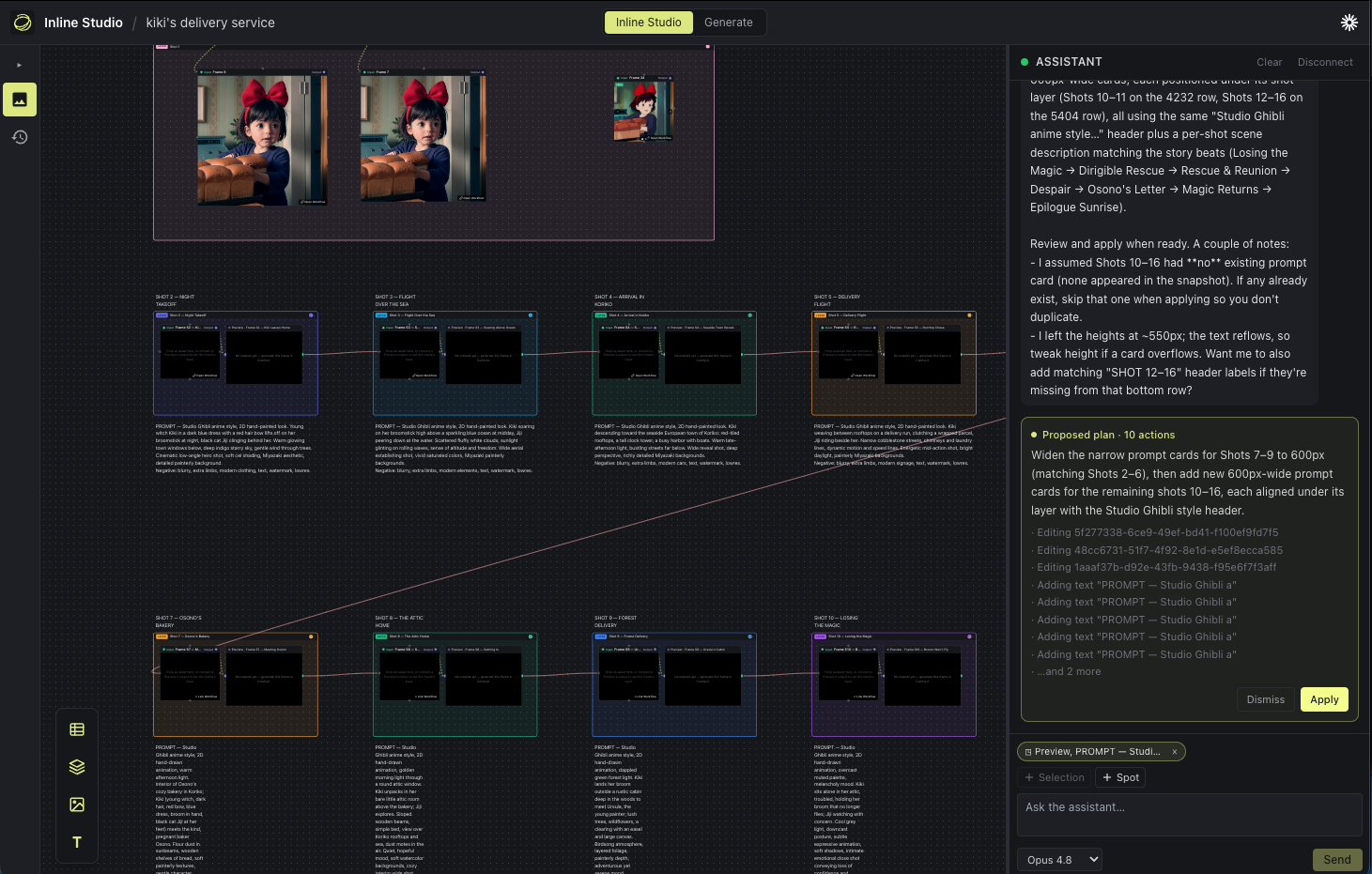
Inline Studio runs as one process: the Inline Core engine serves the web UI and does the generation, on a single port.
Like ComfyUI, the built web UI ships as a Python package, so you only need Python 3.11+, no Node. With uv (or plain pip):
git clone https://github.com/inlineresearch/Inline-Studio.git && cd Inline-Studio
cd core
./webui.sh --install --extra zimage      # create the venv, install the engine + Z-Image runtime + UI
./webui.sh                               # serve the UI + API on http://127.0.0.1:8848
webui.sh is the one command you need: it installs dependencies, makes sure the web UI is present (the prebuilt inline-studio-frontend package, or a local build), then serves everything. See Command-line options for every flag (--listen, --port, --lowvram, --multi-gpu, …).
Prefer pip? pip install -r requirements.txt (from the repo root) pulls the engine, the prebuilt UI, and the Z-Image runtime from PyPI; then run inline-studio.
To hack on the web UI you need Node.js 20.11+ as well, and you serve a local SPA build:
git clone https://github.com/inlineresearch/Inline-Studio.git && cd Inline-Studio

# 1. Build the web UI
npm install
npm run build:spa                        # -> dist-web/

# 2. Set up + run the engine, serving your local build
cd core
uv sync --extra server --extra zimage    # server + the Z-Image runtime (torch/diffusers)
uv run python main.py --front-end-root ../dist-web
Then open http://127.0.0.1:8848. Add your fal.ai API key in Settings for hosted models, and set up local generation as in Three ways to generate. The canvas and planning work without any models.
Hot-reload: run the engine as above, then in another terminal npm run dev:web (Vite serves the UI with HMR and proxies API calls to Core).
The friendly webui.sh launcher (in core/) maps flags onto the engine's INLINE_* environment knobs; core/main.py takes the same flags when you run the engine directly. ./webui.sh --help lists them all.
Show all command-line flags
webui.sh / main.py flag |
Env var | What it does |
|---|---|---|
--listen |
INLINE_HOST=0.0.0.0 |
Bind all interfaces so other machines can reach it |
--host ADDR |
INLINE_HOST |
Bind a specific address (default 127.0.0.1) |
--port N |
INLINE_PORT |
Port to serve on (default 8848) |
--models-dir PATH |
INLINE_MODELS_DIR |
Where model weights are scanned from (default ./models) |
--data-dir PATH |
INLINE_DATA_DIR |
Where runs + takes are written (default ./.inline) |
--lowvram |
INLINE_PROFILE=lowvram |
Tight-VRAM profile (VAE tiling/slicing, attention slicing) |
--cpu |
INLINE_PROFILE=cpu |
Force CPU generation |
--profile NAME |
INLINE_PROFILE |
Set the profile explicitly: gpu-max | lowvram | cpu |
--vram-budget GB |
INLINE_VRAM_BUDGET_GB |
Treat the GPU as having GB of usable VRAM |
--multi-gpu [SPEC] |
INLINE_PARALLEL |
Split one image's denoise across GPUs (e.g. pipefusion=2); auto with 2+ GPUs |
--front-end-root DIR (main.py) |
INLINE_FRONTEND_ROOT |
Serve a local SPA build instead of the installed UI package (dev) |
--rebuild (webui.sh) |
n/a | Force a fresh SPA build (npm run build:spa) from source and serve it on the one port; use after UI changes when not running --dev. Needs the repo checkout + Node/npm |
webui.sh also has --install / --extra NAME to set up the venv. New to Inline Studio? The Getting Started guide walks you through your first render.
Yes. Inline Studio is free and open source under the MIT license. There's no paid tier to use the app.
Only for local generation. The built-in Inline Core engine renders on the GPU of whatever machine runs it (you can also run it on a remote GPU box and open the UI from your laptop). Hosted fal models need no GPU at all, and the canvas + planning work with no GPU either.
See Three ways to generate: local Z-Image on your own GPU, hosted fal models, or your own ComfyUI. Adding a new local model is a Core change (a model runner), no UI release.
Not for the built-in generation: that's all Inline Core now, with nothing external to stand up. You can still connect your own ComfyUI server and drive it from the Generate tab, but that path is legacy and being discontinued in favour of Inline Core, so don't build anything new on it.
Inline Studio is early and moving fast, any issues, ideas, and pull requests are all welcome. If you're poking at the code, CLAUDE.md is the engineering guide: it explains the architecture, the data model, and the conventions to follow.
Want to help by using it for real? Try the creator task: build a short 20-second AI film in Inline Studio and send us your feedback.
Inline Core's multi-GPU denoise builds on xDiT's PipeFusion and Ulysses parallelism.
Are you an AI filmmaker who wants to help us make this better? We run a paid trial feedback program: use Inline Studio on real work, tell us what helps and what gets in your way, and get paid for your time.
Come say hi on our Discord and reach out, we'll get you set up.
MIT.