



The easiest way to create a DEB or RPM package of your CustomTkinter project! You can create a small DEB or RPM package without deep packaging experience.
pip install CTkDeb[gui]- Creating DEB packages requires the
dpkg-debtool (pre-installed on most Debian-like systems, probably does not need to be installed separately). - Creating RPM packages requires the
rpmbuildtool.
Run this in the project folder (relative to which the paths in the config are specified)
ctkdeb-gui
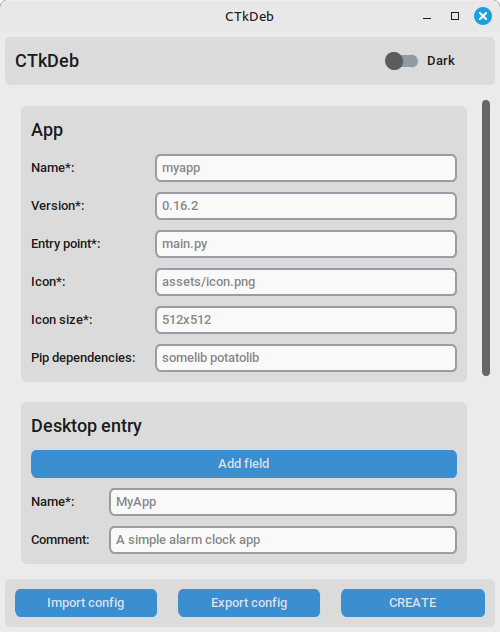
ctkdeb config.json --create deb
View all arguments:
ctkdeb --help
from ctkdeb import Packager

packager = Packager("config.json")
packager.create_deb()
# or
packager.create_rpm("fedora")
View all supported RPM distros:
from ctkdeb import show_supported_rpm_distros
show_supported_rpm_distros()
Arguments:
| Argument | Type | Description |
|---|---|---|
| json_path | str or dict | Path to the JSON config (or its dict), required |
| project_folder | str | Path to the project folder (if the command is not executed from it) |
| desktop_entry | str | Path to the custom desktop entry (or its text) |
| output_folder | str | Path to the output folder |
- Do I need to specify Tkinter and CustomTkinter as dependencies?
No, CTkDeb has already taken care of that; just specify third-party dependencies, if any.
- What about dependencies?
Pip dependencies are recommended only if they are written in pure Python (e.g., CTkMenuBar). If not, it's better to search for the required dependency in the distribution repositories and specify it as a DEB or RPM dependency. For example, for Pillow, specify python3-pil for DEB or python3-pillow for RPM (Fedora/Mageia) instead of pillow in the Pip dependencies line.
App icon: Claude Sonnet 5.